
Best Discounts
The best discounts this week
Every week you can find the best discounts here.


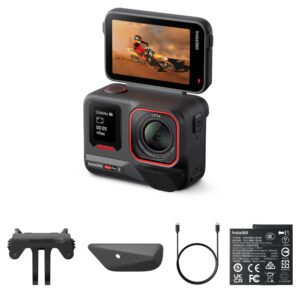
Insta360 X4 Camera
€508.07
In Stock
- All-in-one 360° camera capturing stunning footage in 5.7K resolution.
- Features FlowState stabilization for smooth video experiences.
- Waterproof up to 10 meters without additional housing.
- HDR mode enhances color vibrancy and contrast optimization.
- Automatic stitching technology for seamless 360° video creation.
- AI-assisted editing tools for enhanced creative content.
- Compatible with the Insta360 app for easy editing and sharing.
- Compact and lightweight design, perfect for on-the-go use.
In Stock
- Delivered today (order Mon-Fri before 12:00, delivery between 17:00 and 22:00)
- Including shipping costs, sent by buymefy.com
- Pick up at a buymefy.com collection point is possible
- 30 days to change your mind and free returns
- Day and night customer service
Description
How to Use the Insta360 X4
Getting Started
- Unbox your Insta360 X4 and ensure all accessories are included:
- Insta360 X4 Camera
- Lithium-Ion Battery
- Protection Case
- USB-C Cable
- Lens Protector
- Cleaning Cloth
- User Manual
- Charge the battery using the USB-C cable until fully charged.
- Insert the battery into the camera until it clicks into place.
Setting Up the Camera
- Turn on the camera by pressing the power button.
- Download and install the Insta360 App on your smartphone.
- Connect your camera to your phone via WiFi or Bluetooth:
- Open the Insta360 App.
- Select “Connect Camera” and follow the on-screen instructions.
Capturing Footage
- Select your desired shooting mode:
- Video Mode for recording videos.
- Photo Mode for capturing still images.
- Adjust settings as needed:
- Choose video resolution (5.7K recommended for best quality).
- Enable HDR mode for enhanced colors and contrast.
- Frame your shot and press the record button to start capturing.
- Use voice commands for hands-free operation (e.g., “Start recording”).
Editing Your Content
- After capturing, open the Insta360 App.
- Connect your camera to the app and download your footage.
- Use the AI-supported editing tools to create dynamic content.
- Export your edited videos or photos for sharing on social media.
Maintaining Your Camera
- Keep the lens clean using the provided cleaning cloth.
- Store the camera in the protection case when not in use.
- Avoid exposure to extreme temperatures outside the range of -10°C to 40°C.
- Regularly check for firmware updates via the Insta360 App.
Safety Precautions
- Do not expose the camera to water beyond its waterproof limit (10 meters).
- Avoid dropping or subjecting the camera to strong impacts.
- Keep the camera away from extreme heat sources.
Conclusion
Your Insta360 X4 is now ready to capture stunning 360° footage! Enjoy exploring your creative potential!
Related products


Reviews
There are no reviews yet.